Improve your Wi-Fi network coverage & speed and help you get what you paid. for example, you paid for 1000M(1G) download speed to internet service provider, but you only get 50% or less than it in many rooms inside your house.
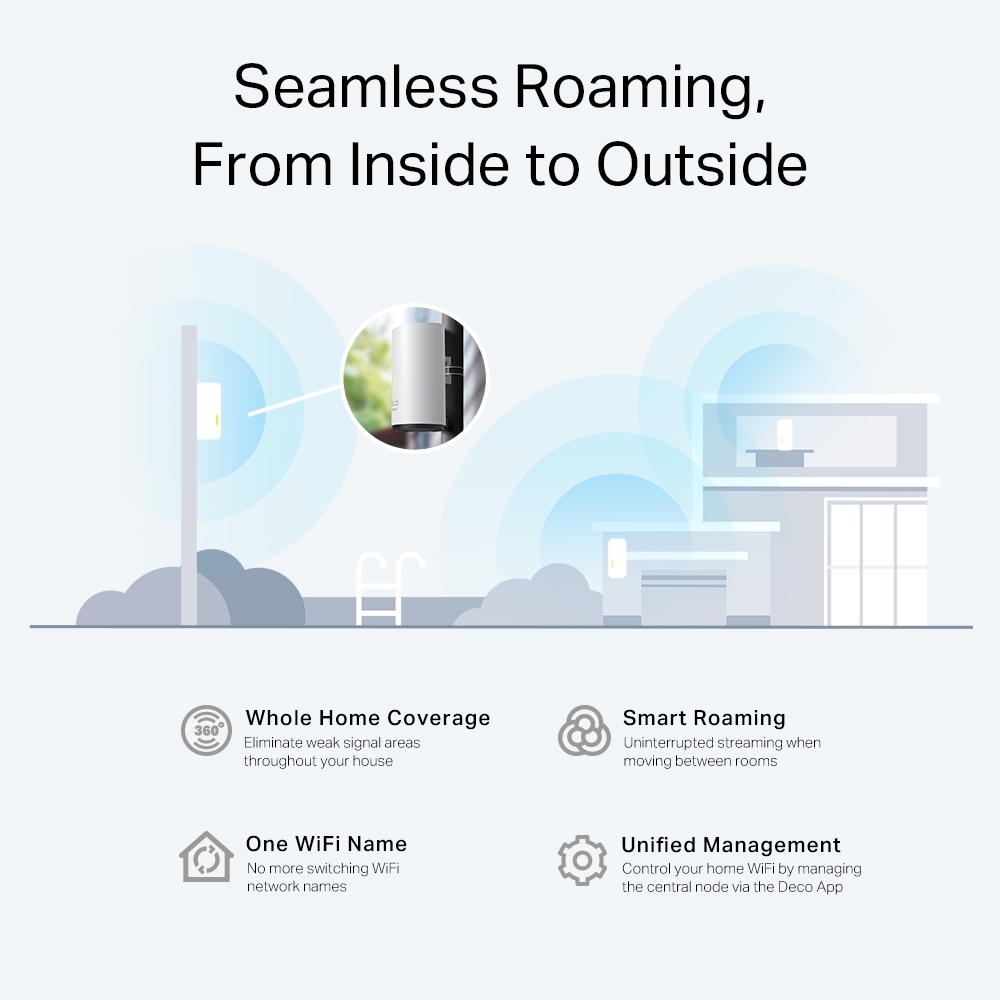
Save money. Only use one internet line to cover all of your property (living room, bedroom, basement, office, garage, gym house, swimming pool house, shop, barn, guest house, greenhouse, bunkhouse, boat house, coach house, family members’ house nearby within 20 km within line of sight)
With only one Wi-Fi network for your entire property has many benefits such as:
You can use your office printer or watch TV from anywhere on your property.
You can call or facetime anywhere on your property where the mobile phone signal (3G/4G/5G) can not reach.
Your Wi-Fi network is separate from your internet service provider. Even if you switch to another internet service provider, you don’t need to change anything inside your property (such as: Wi-Fi name, password, etc.)
If you have two internet connections from different internet service providers for backup, you don’t need to change anything in case one of them shuts down.
Install a smart system. Examples include: smart outdoor cameras, smart video doorbell, smart audio system, smart alarm system, smart garage door opener, smart door lock, smart lighting that you can control on your phone, at anytime and anywhere in the world.
In the digital era of the internet, the internet has become an indispensable part of life. With improved economic level, people have a higher pursuit of life quality, and every family has higher requirements for network speed, stability, and coverage. All these factors make the advent of the gigabit era an irresistible trend of the times.
This evolution is reflected in infrastructure:
The 10M era featured Fibre to the Building (FTTB)
The 100M era brought Fibre to the Home (FTTH)
The 1000M era is introducing Fibre to the Room (FTTR).
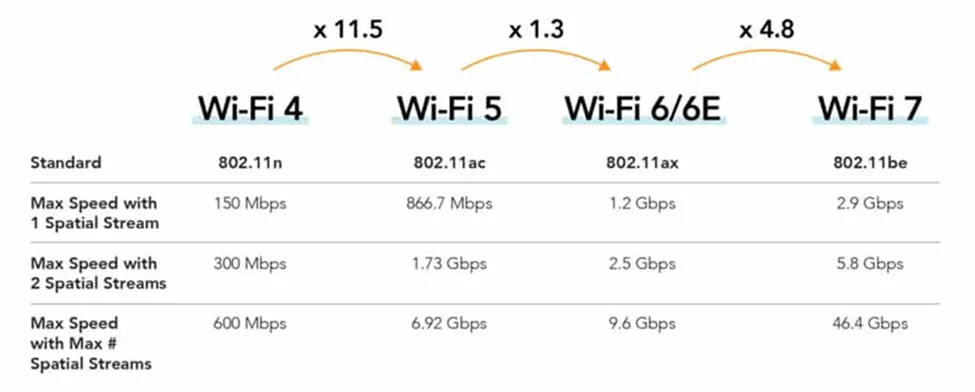
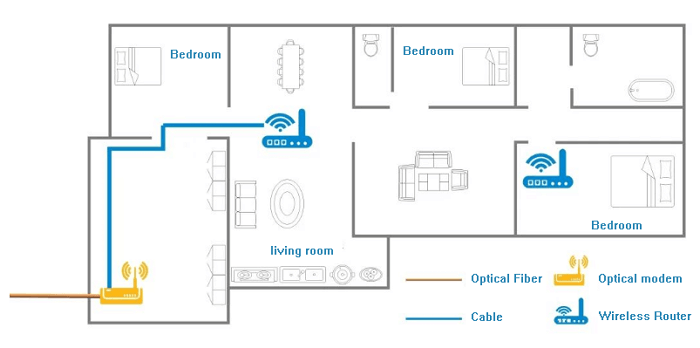
FTTR is a new coverage mode of the home network in the gigabit era, representing another technological evolution and upgrade in home networking. In the past, fibre optic were primarily used in the living room, but now the coverage extends into every room. With low latency, high quality, and high stability, FTTR achieves 7 gigabit coverage throughout the entire house.
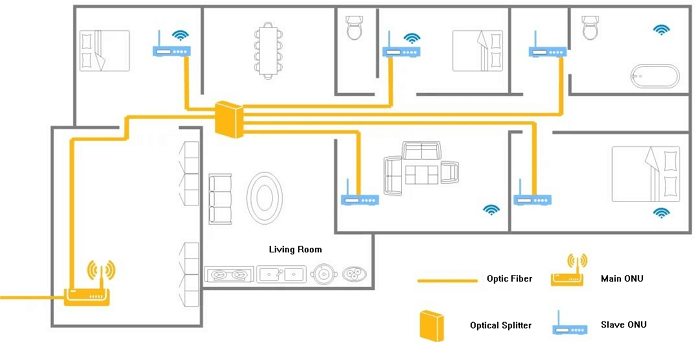
To put it simply, if the Gigabit optical network is compared to a highway, FTTH is like paving the road to the front door of the house, while FTTR is like paving the road directly to every room inside the house. This effectively solves the problem of indoor Wi-Fi network coverage, and simultaneously eliminates buffering or connectivity issues.
The stable, super-gigabit Wi-Fi network coverage reaches every corner of the home and provides a five-star broadband experience with low latency, multiple connections, and super-high speeds, meeting the high quality network needs o the whole family. People can enjoy VR movies, VR games, 4K/8K videos, real-time meetings, and ultra-smooth online classes anytime, anywhere. A digital ‘Utopia’ era is truly built by balancing life and work.
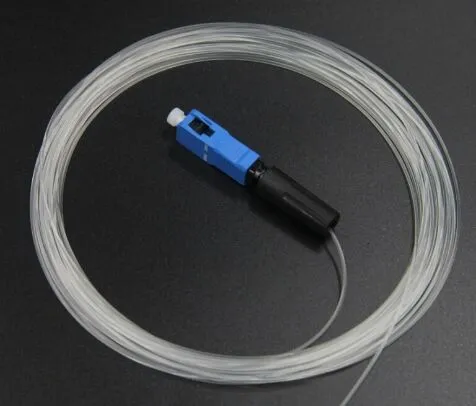
An Invisible Fibre Cable is a cutting-edge development in the world of fibre optics. It offers all the advantages of traditional fibre optic cables—such as high-speed data transfer, low latency, and reliable connectivity—while being designed to blend seamlessly into the environment. It is made from ultra-thin, transparent materials, the Invisible Fibre Cable can be installed on walls, ceilings, and floors without disrupting a room’s aesthetics.
Traditional fibre optic cables, while effective, can be difficult to conceal. They often require extensive installation efforts, including drilling holes and running cables through walls, which can be both time-consuming and invasive. In contrast, the Invisible Fibre Cable offers a solution that is both high-performance and aesthetically pleasing, making it an ideal choice for modern homes and offices where design and functionality are equally important.
The introduction of Invisible Fibre Cable is particularly significant in FTTR setups. In such systems, the goal is to provide high-speed internet access to every room without compromising the interior design. The Invisible Fibre Cable allows for this by offering a nearly invisible solution that doesn’t interfere with the overall look of a space.
Key Features of FTTR Invisible Fiber Cable
Transparency
One of the most notable features of Invisible Fiber Cable is its transparency. Made from ultra-thin materials, the cable is designed to be nearly invisible once installed. This makes it an excellent choice for homes and offices where aesthetics are a priority. Whether it is run along walls, ceilings, or floors, Invisible Fiber Cable blends seamlessly into the environment, maintaining the clean, uncluttered appearance of a room.
High-Speed Performance
Despite its delicate appearance, Invisible Fiber Cable does not compromise on performance. It is capable of delivering high-speed data transfer rates, ensuring that users experience fast and reliable internet connectivity. This makes it suitable for a wide range of applications, from streaming high-definition videos to online gaming and remote work.
Durability and Flexibility
Invisible Fiber Cable is designed to be both durable and flexible. The materials used in its construction allow it to withstand the rigors of installation and everyday use without losing integrity. Additionally, the cable’s flexibility makes it easy to route around corners and obstacles, simplifying the installation process and ensuring that it can be used in a variety of environments.
Installation Ease
One of the key advantages of Invisible Fiber Cable is its ease of installation. Unlike traditional fiber optic cables, which may require drilling and extensive routing, Invisible Fiber Cable can be installed using simple adhesive methods. This not only reduces installation time but also minimizes damage to walls and other surfaces. The result is a clean, professional-looking installation that doesn’t disrupt the aesthetic of a space.
How Invisible Fiber Cable Works in FTTR Systems
Invisible Fiber Cable operates on the same principles as traditional fiber optic cables, where data is transmitted as light signals through glass or plastic fiber. The key difference lies in the materials used, which are engineered to be transparent and ultra-thin, allowing the cable to blend seamlessly with its surroundings.
In an FTTR (Fiber to the Room) system, Invisible Fiber Cable is typically run from a central distribution point to various rooms within a building. The cable is installed along walls, ceilings, or floors, where it remains virtually invisible. Once in place, it provides a direct fiber connection to each room, ensuring that high-speed internet is available wherever it is needed.
For example, in a residential setting, Invisible Fiber Cable can be installed in a living room, bedroom, and home office, providing each space with its own fiber connection. This setup ensures that all family members can enjoy fast and reliable internet, whether they are streaming movies, playing online games, or working from home.
The technology behind Invisible Fiber Cable involves the use of specially designed materials that allow light signals to pass through with minimal loss. These materials are engineered to be both transparent and highly efficient, ensuring that the cable can transmit data at high speeds without compromising on performance.
Benefits of Using Invisible Fiber Cable in FTTR
Aesthetic Appeal
One of the most significant benefits of Invisible Fiber Cable is its aesthetic appeal. Traditional fiber optic cables can be difficult to conceal and may disrupt the visual harmony of a space. In contrast, Invisible Fiber Cable is designed to be nearly invisible, allowing it to blend seamlessly with its surroundings. This makes it an ideal choice for homes and offices where appearance is important.
Enhanced Connectivity
Invisible Fiber Cable provides consistent high-speed internet access to every room in a building. This ensures that users can enjoy the same level of connectivity regardless of where they are, eliminating the frustration of slow or unreliable internet. Whether you are streaming high-definition content, playing online games, or working remotely, Invisible Fiber Cable ensures a fast and reliable connection.
Comparison with Traditional Fiber Optic Cables
Visual Impact
The most significant difference between Invisible Fiber Cable and traditional fiber optic cables is their visual impact. Traditional cables are often visible and can be difficult to conceal, especially in homes and offices where aesthetics are a priority. In contrast, Invisible Fiber Cable is designed to be nearly invisible, making it a superior choice for those who want high-performance connectivity without compromising the appearance of their space.
Performance Metrics
In terms of performance, Invisible Fiber Cable offers comparable speed, latency, and reliability to traditional fiber optic cables. Users can expect the same high-speed internet and low-latency connections, making Invisible Fiber Cable a viable alternative for FTTR systems. Whether you are streaming, gaming, or working, Invisible Fiber Cable ensures that you have the connectivity you need.
Cost Considerations
While Invisible Fiber Cable may be more expensive than traditional fiber optic cables due to its specialized materials and design, the added benefits of aesthetic appeal and ease of installation can outweigh the cost for many consumers and businesses. Additionally, the long-term benefits of a future-proof solution can provide significant value over time. When considering the overall value, Invisible Fiber Cable offers a compelling option for those looking to invest in a modern, high-performance networking solution.
Conclusion
FTTR Invisible Fiber Cable represents a significant advancement in networking technology, offering a solution that combines high performance with aesthetic appeal. By delivering high-speed internet to every room in a building without compromising the appearance of a space, Invisible Fiber Cable is quickly becoming the go-to choice for modern homes and offices. Whether you are looking to future-proof your home, improve your internet connectivity, or simply enjoy a cleaner, more organized space, FTTR Invisible Fiber Cable offers a solution that meets all your needs.
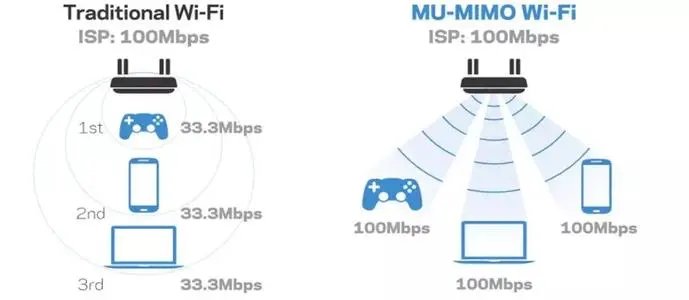
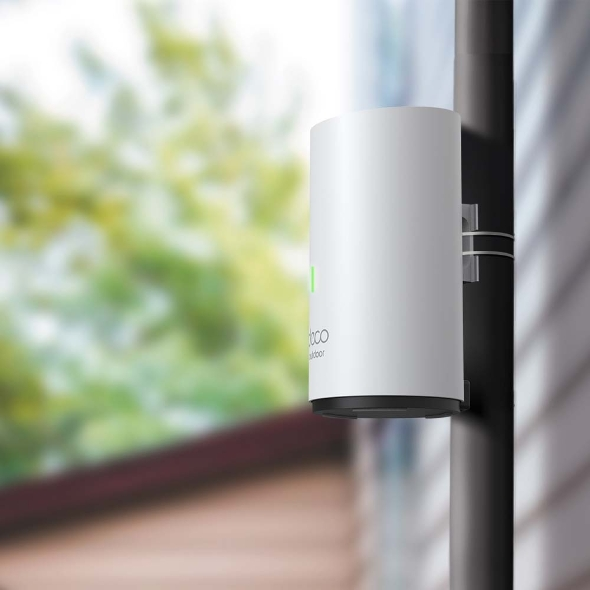
Mesh Wi-Fi is a whole home Wi-Fi system built to eliminate dead zones and to provide uninterrupted Wi-Fi throughout your home. Mesh systems enables devices in your network to have faster speeds, greater coverage, and a more reliable connection. While traditional routers broadcast Wi-Fi from a single point, mesh Wi-Fi systems have multiple access points. When one unit links to the modem, that unit becomes the main hub. The other units (called “nodes”) will capture and rebroadcast the router’s signal. The result is an efficient wireless network that provides a strong signal no matter where you are.
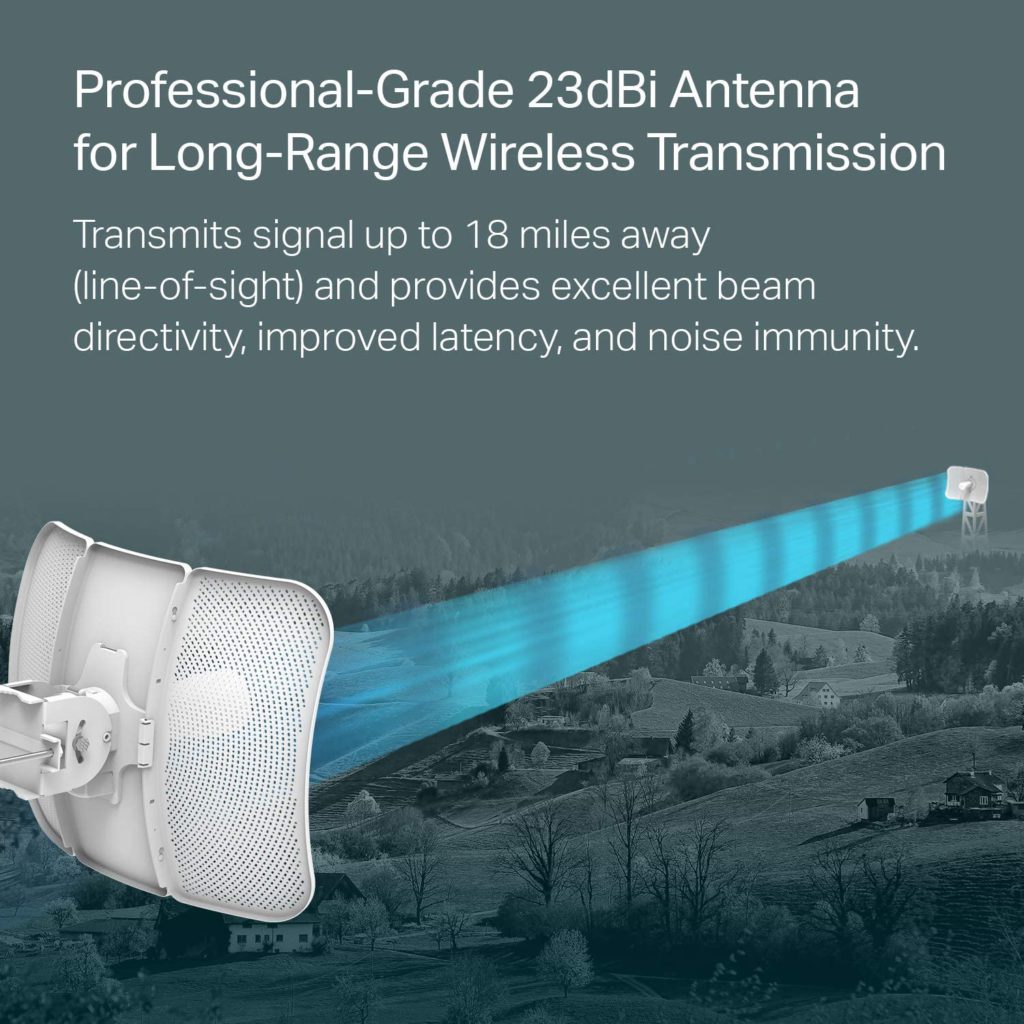
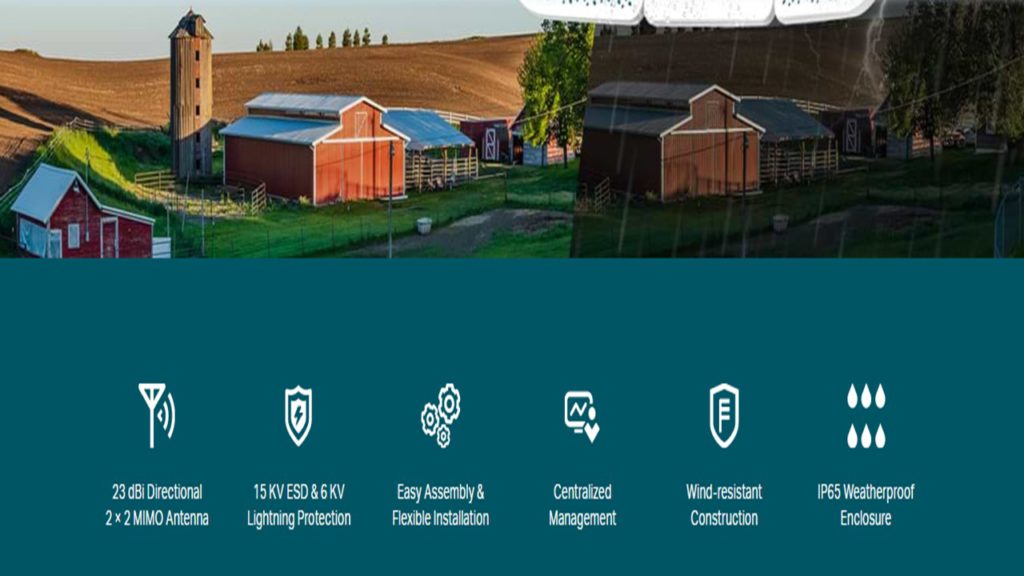
HARDWARE FEATURES Processor: Qualcomm 750MHz CPU, MIPS 74Kc Memory: 128 MB DDR2 RAM, 16 MB Flash Interface: 1 10/100/1000 Mbps Shielded Ethernet Port (LAN/POE); 1 Reset Button Power Supply: Passive Power over Ethernet via LAN (+4,5pins; -7,8pins) Voltage range: 16-27V DC Dimensions ( W x D x H ) 14.4 x 11.0 x 8.1 in. (366 x 280 x 207 mm) Antenna Gain 23 dBi Antenna Beamwidth 9° (Azimuth)/7° (Elevation) Protection 15 KV ESD Protection 6 KV Lightning Protection Enclosure Material: Outdoor PC stabilized plastic Weatherproof: IP65 water and dust proof design WIRELESS FEATURES Wireless Standards IEEE 802.11a/n/ac Wireless Speeds Up to 867 Mbps (80 MHz, Dynamic) Up to 400 Mbps (40 MHz, Dynamic) Up to 173.4 Mbps (20 MHz, Dynamic) Frequency 5.15–5.85 GHz Transmit Power Max. 27 dBm (Adjustable power by 1dBm) Operating Temperature: -40℃~70℃ Certification: CE, FCC, RoHS
Record and view in 1080p HD video during the day and with infrared HD night vision after dark.
Photo resolution
View captured images in 640 x 360 nHD
Camera frame rate
Up to 30 fps
Size
71 x 71 x 31 mm2.8 x 2.8 x 1.6 inches (70 x 70 x 41 mm)
Weight
5.0 oz (141 g)
Operating temperature
-20 to 45° C
Power
Battery: 2 AA 1.5V lithium metal batteries (non-rechargeable) Sync Module 2 power: 100-220V AC to 5V DC converter included. Battery life of up to two years, based on default settings. Battery life will vary based on device settings, use, and environmental factors.
Record and view in 1080p HD video during the day and with infrared HD night vision after dark.
Photo resolution
View captured images in 640 x 360 nHD
Camera frame rate
Up to 30 fps
Size
130 x 42 x 27 mm
Weight
91 grams
Power
Doorbell Power: 2 AA 1.5V lithium metal (non-rechargeable) batteries. Battery life of up to two years, based on default settings. Features may vary with configuration and settings. Battery life will vary based on device settings, use, and environmental factors.
Requirements
Always-on high-speed internet connection (such as broadband, fiber, or DSL). Wifi network: 2.4 GHz 802.11b/g/n.
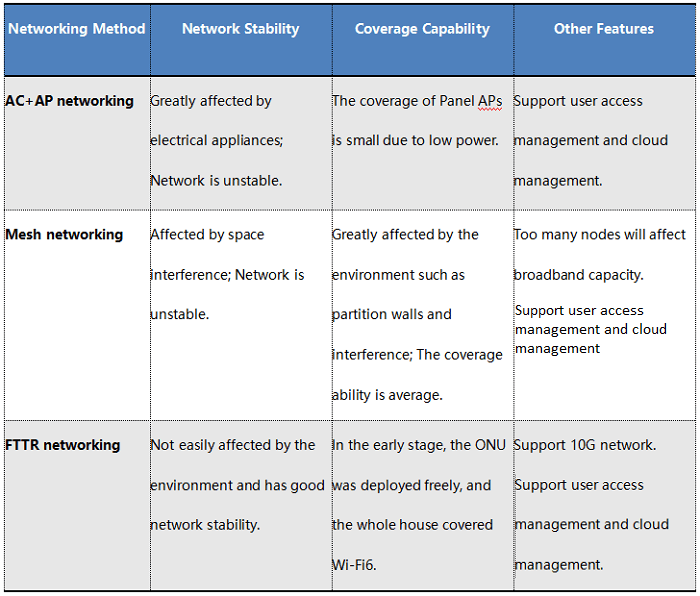
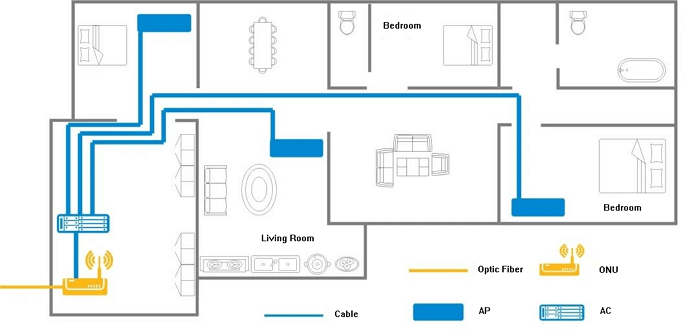
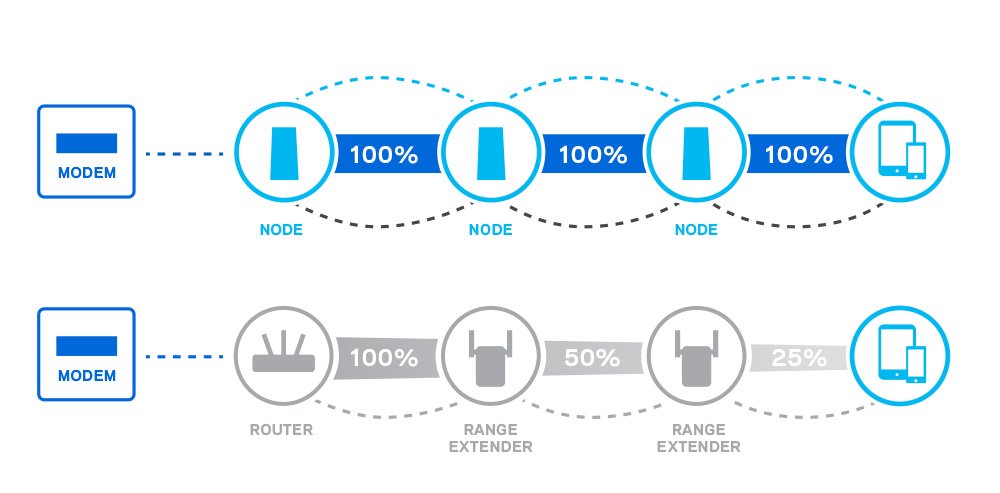
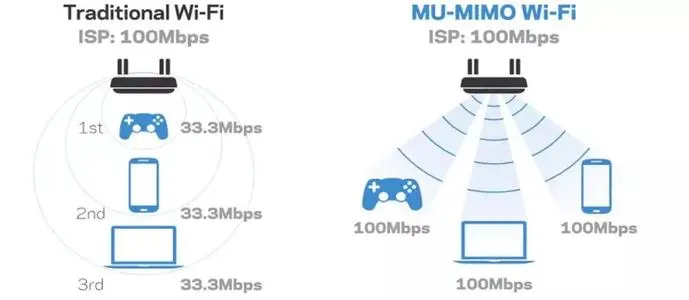
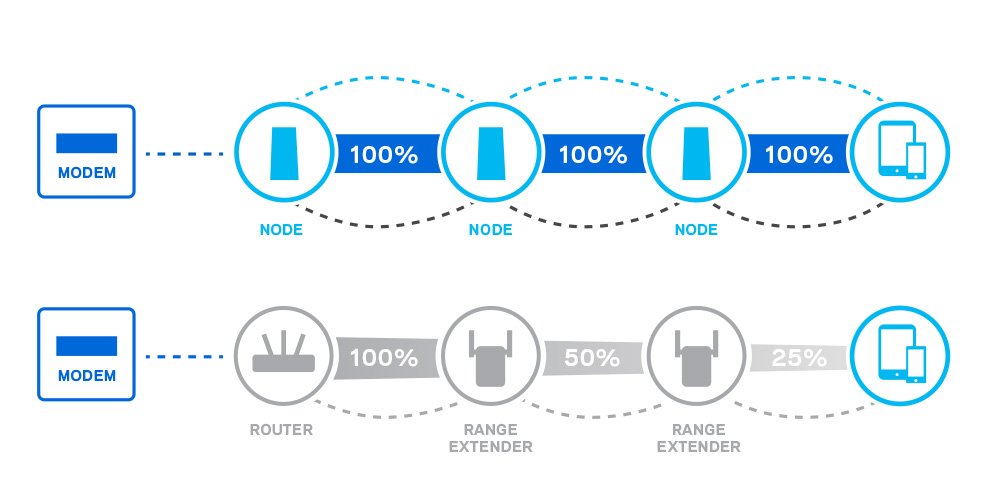
Traditional Single router come with a limited range. While adding a range extenders/booster can help with this issue, these devices (including bridge routers and AC+AP setups) sacrifice speed for connectivity. Mesh Wi-Fi gives you the best of both worlds, allowing you to experience both powerful speeds and long-range connectivity.
Mesh Wi-Fi devices come with roaming protocols to keep you on the same network, as well as mesh technologies such as self-healing and adaptive routing to keep your network stable.
Range extenders, boosters, bridge routers, and AC+AP setups require you to sign on to a new network manually to maintain a strong connection once you are far enough away from your main router. Most of these devices are set up as different networks, but with mesh networks, there are no other networks to worry about. While each mesh node essentially functions as its own router, range extenders merely duplicate the router’s original signal.
Mesh Wi-Fi is faster and more efficient at delivering a Wi-Fi signal than a range extender. If you need help extending your Wi-Fi, you must choose between a range extender and a mesh system. Wi-Fi extenders typically connect to your existing wireless network, broadcast a new network name, and blindly relay traffic back to your wireless router. This usually means you will see two network names: one offered by your wireless router and another offered by the extender.
You have probably seen this before, where a home network has “SmithHouse” for upstairs and “SmithHouse_EXT” for downstairs. Your devices will often stay connected to one until they are completely out of range. This means you will still have slow Wi-Fi at multiple points in your house unless you manually switch back and forth between networks as you move around, which is a huge hassle.
Repeating the entire Wi-Fi signal is also inefficient; an extender merely listens to every packet and rebroadcasts it. There is no internal logic to send packets along the correct path.
More importantly, range extenders can often slow things down. Wireless is “half-duplex,” which means a wireless device cannot send and receive information at the same time—every device on the same channel has to take turns talking, including devices on your neighbor’s Wi-Fi networks. Range extenders exacerbate this inefficiency because they have to repeat everything they “hear,” similar to someone following you around all day and repeating everything you say before someone else can talk.
Finally, managing these extenders is often a pain. Many routers require you to visit a web page to alter settings or download updates, and if your extender is from a different brand, you will be dealing with two different sets of software. In many cases, that software can feel complex and archaic.
There are exceptions to these points, of course. Some range extenders have more modern software and can overcome some bandwidth issues when paired with routers from the same manufacturer designed to be used together. However, there is no guarantee you will be able to do this with your existing router, and at that point, the line between an extender and a mesh system becomes blurry.
Do I have to purchase a new router to get mesh Wi-Fi?
Yes. You need purchase at least 2 packs of the Mesh Wi-Fi router to set up a Mesh Wi-Fi network and integrate it with your current internet router seamlessly.
Will Mesh Wi-Fi work if I have brick, stucco, or concrete walls in my house?
Yes! Mesh Wi-Fi systems will work in houses with these conditions. However, most routers (including mesh Wi-Fi) may experience some drop in connectivity due to environmental factors.
Does Mesh Wi-Fi work with older devices?
Yes it does! Mesh Wi-Fi Routers will setup a second Wi-Fi network in your home beyond your current Internet Wi-Fi.
What are the wireless standards of Mesh Wi-Fi?
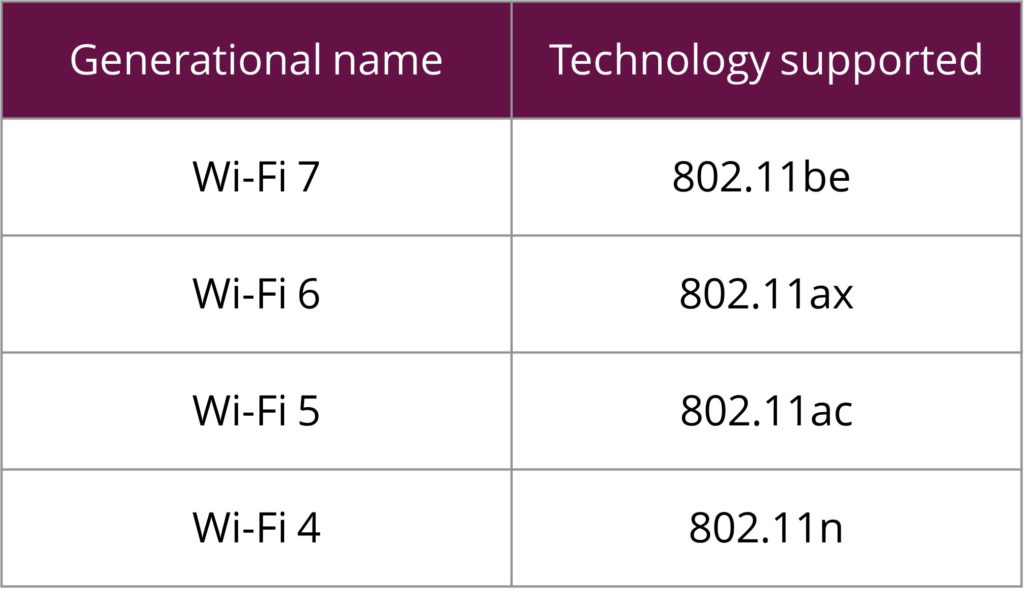
IEEE 802.11 be/ax 6 GHz
IEEE 802.11 be/ax/ac/n/a 5 GHz
IEEE 802.11 ax/n/b/g 2.4 GHz
Frequency: 2.4 GHz , 5 GHz , 6 GHz
Wireless Security: WPA/WPA2/WPA3
What are the environmental requirements for the Mesh Wi-Fi?
Operating Temperature: 0°C~40°C (32°F~104°F)
Storage Temperature: -40°C~70°C (-40°F~158°F)
Operating Humidity: 10%~90% non-condensing
Storage Humidity: 5%~90% non-condensing
What are the hardware specifications of the Mesh Wi-Fi system?
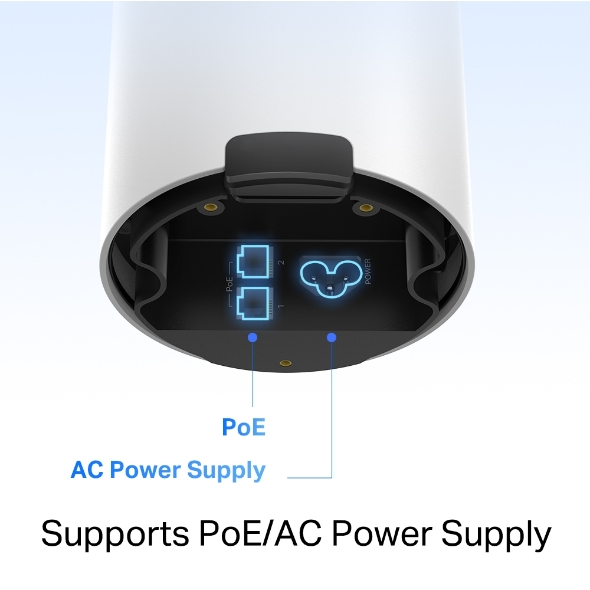
Ports: 1G/2.5G bps WAN/LAN Ports, 1 Power Port
Buttons: 1 Reset button on the underside
Power Adapter Input: 100-240V~ 50/60Hz 0.3A
Power Adapter Output: 12V ⎓ 1A
What are the software specifications of the Mesh Wi-Fi?
Working Mode: Router, Access Point
WAN Type: Dynamic IP/Static IP/PPPoE/L2TP/PPTP
DHCP: Server, Client
Quality of Service: WMM
Firewall Security: SPI Firewall
Protocols: Supports IPv4 and IPv6
Guest Network
Features: Parental Controls, QoS (Quality of Service), Reporting, Assisted Setup, Address Reservation, Port Forwarding, VLAN, IPv6, LED Control
Management: Local Management, Remote Management
What are the Robust Parental Controls for the Mesh Wi-Fi?
It manages content and control when each device can access the internet. You can:
Profiles – Create a profile for each family member, and manage them individually
Content Filter – Four levels are available for filtering content, each catering to a specific age group
Time Controls – Set daily time limits for the total time spent online and block a person’s internet access between certain times
Pause the Internet – Pause a family member’s internet and resume it whenever you like
Where can I find Mesh Wi-Fi products?
Many of their products are on the market. You can find mesh networking products on Home Depot, Best Buy, Costco and other places where electronics are sold.
But it’s difficult to find out which model is the right choice for your current network situation. That’s why you need a technical consultant to help you.
A sales person at Best Buy/Costco always want to sell the top level product for maximum profit.
DO NOT waste your money on WRONG products !
How much does Mesh Wi-Fi cost for different properties?
The cost for a Mesh Wi-Fi system ranges from $800-$3000, with the final price dependent on the specific situation and needs of your property.
Pricing Breakdown:
Fee Structure: This is a one time fee
Installation: The price includes full installation services
Tax: Applicable taxes are not included in the quoted range and will be an additional charge